The Redesign Trap: Why ‘Clean’ Web Design Destroys Organic Traffic
TLDR – I’m a little wordy on this one, so here is the quick summary.
A website redesign is the single highest-risk event for your organic revenue. Business owners treat it like a fresh coat of paint; Google treats it like bulldozing the building. When done without regard to what you’ve already built up organically, you can remove all your hard work. But you can redesign your site, but do it strategically so you don’t gut your organic traffic.
Your new website looks incredible. The animations are smooth, the layout is clean, and the mobile experience finally feels modern. Three months later, your organic traffic is down 60 percent, and your phones have gone quiet.
This is the redesign trap, and it happens to businesses every single day.
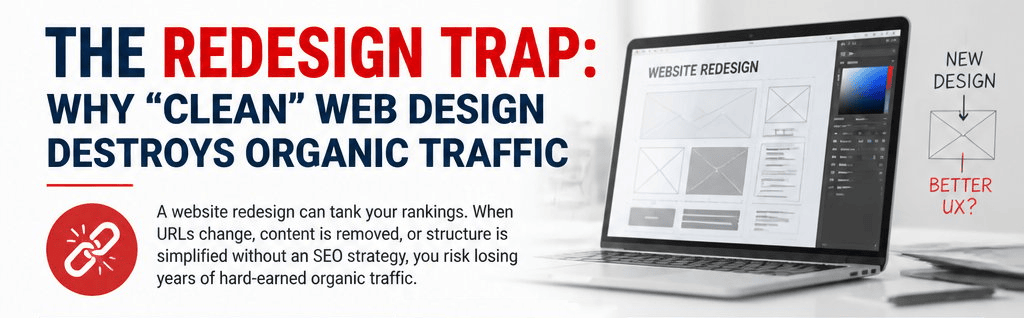
A website redesign is the highest-risk event in a site’s entire lifecycle. Business owners treat it like a fresh coat of paint. Google treats it like demolition and rebuilding from scratch. The search engine has spent months or years mapping your URLs, indexing your content, and assigning authority to specific pages. When you rip all of that out and replace it with something new, you are not refreshing your site. You are demolishing the structure Google has learned to trust.
Consider a high-ticket adventure travel company that invested in a full redesign to modernize its brand and improve conversions. The visual output was genuinely excellent. The SEO outcome was a disaster. Understanding what went right and what went catastrophically wrong is the clearest way to explain how website redesign SEO should actually work.
At TinkerLytics, working across SEO, Google Ads, and marketing consulting means sitting in on these exact conversations regularly. The pattern is almost always identical: the design team does their job well, and the SEO protection work never happens at all. If your business is planning a redesign or you are already watching your rankings fall post-launch, reach out to TinkerLytics at (541) 241-6166 or visit tinkerlytics.com to get a clear picture of where you stand before more ground is lost.
Why Redesigns Destroy SEO Equity
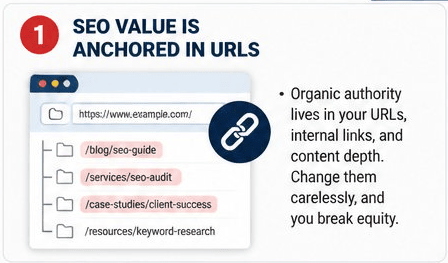
Most business owners assume a redesign is a visual project. It is not. It is an SEO migration. The distinction matters enormously because organic search value is not stored in your brand or your design; it is stored in specific URLs, specific words, and the web of internal links connecting them.
How Organic Search Value Gets Attached To Specific URLs
Google indexes individual URLs, not websites. When a page earns backlinks over time, those links point to a specific address. When that page accumulates clicks, dwell time, and engagement signals, those signals are attached to that address. The domain authority behind a page is not floating freely; it is anchored to the URL itself.
When you change a URL without a proper 301 redirect, you sever that connection. The old address becomes a dead end. The new address starts from zero.
What Happens When Historical Content And Internal Links Disappear
Search engines use crawlability and internal linking to understand site structure and assign topical authority. When you delete pages or consolidate content, you strip out the internal links that pointed to those pages. You also remove the text Google used to understand what those pages were about.
Thin or missing copy is one of the fastest ways to signal to a crawler that a page has less topical depth than it did before. Internal links that no longer exist mean PageRank stops flowing through your site the way it did.
Why Rankings Often Drop And Do Not Rebound On Their Own
The recovery timeline after a poorly managed redesign is not weeks. It is often six to eighteen months, and sometimes rankings never fully return. Google has to re-crawl, re-index, and re-evaluate every changed page. If redirects are broken, if content is thinner, and if the backlink profile now points to 404 pages, there is no self-correcting mechanism. The site simply loses ground and stays there without active intervention.
What To Preserve Before A Single Design Mockup
Before any wireframe gets drawn, you need a full baseline of your current site’s performance. The specific numbers you capture now become your benchmark for detecting post-launch damage early.
Baseline Metrics From Google Analytics 4 And Google Search Console
Pull your top landing pages by organic sessions in Google Analytics 4. Sort by conversion rate, not just traffic. A page with modest traffic but strong conversion rates is often more valuable than a high-traffic page that bounces hard.
In Google Search Console, export your top queries by clicks and impressions. Note which URLs are ranking for high-intent keywords. This data becomes your protection list. Nothing on that list should change without a documented plan.
Also record your average session duration and bounce rate by page. These engagement metrics are useful for diagnosing post-launch problems.
How To Identify High-Performing Pages And High-Intent Content
High-performing pages are not always your homepage or your main service pages. They are often deep, granular pages that rank for specific long-tail queries. For the adventure travel company, pages like /alaska-bear-viewing-lodge-trips or /remote-fly-in-fishing-packages were quietly driving high-intent search traffic from people close to booking.
According to a pre-redesign SEO audit framework from Ulement, capturing every critical URL before the first mockup is designed is the technical blueprint that protects your rankings. Inventory your content by traffic, backlinks, and ranking keywords before anyone opens Figma.
Running A Pre-Launch SEO Audit With Screaming Frog And Semrush
Crawl your live site with Screaming Frog before any development work begins. Export every URL with its title tag, meta description, H1, word count, status code, and canonical. This is your before snapshot.
Use Semrush to pull your full keyword rankings and backlink profile. Identify which URLs are earning the most backlink equity. As noted in HubSpot’s website redesign SEO guide, running a link audit before launch lets you protect the pages that matter most rather than discovering what you lost after the fact.
Monitor rankings weekly during the redesign window so you have a clean pre-launch baseline to compare against.
The CRO Wins Designers Usually Get Right
Good designers genuinely do improve conversion-related elements during a redesign, and those wins deserve acknowledgment. In the adventure travel case study, the design team delivered real improvements that would have supported lead generation if the SEO had been protected alongside them.
Navigation, Mobile-First Layouts, And Cleaner User Flows
The redesigned site featured a sticky navigation bar with persistent CTAs, which reduced the number of clicks required to reach a booking inquiry form. The visual hierarchy on category pages was cleaned up considerably, replacing a cluttered text-heavy layout with a card-based grid that made it easier to scan trip options.
Mobile-first execution was strong. The responsive design adapted cleanly across devices, with tap targets sized correctly and contact forms accessible without zooming. Mobile-friendliness is a ranking factor, and the new layout genuinely improved that signal.
Responsive Design, Accessibility, And Better Engagement Signals
The new build passed basic accessibility checks, including improved color contrast ratios and descriptive alt text on images. These improvements support both user experience and search visibility, since accessibility signals overlap with several engagement metrics Google monitors.
Session duration and bounce rate are influenced by how quickly users find what they need. A cleaner user flow, when paired with preserved content, typically improves both.
Where UX Improvements Support Conversion Without Hurting SEO
The problem in the case study was not the UX work. It was that the UX improvements were implemented in ways that deleted SEO-critical content and restructured URLs without any redirect strategy. CRO and SEO are not inherently in conflict. They break each other only when design teams and SEO teams are not coordinated from the start.
A sticky CTA and a 2,800-word page can coexist. The question is how the page is built, not whether it should exist.
The Lethal Mistakes That Tank Visibility
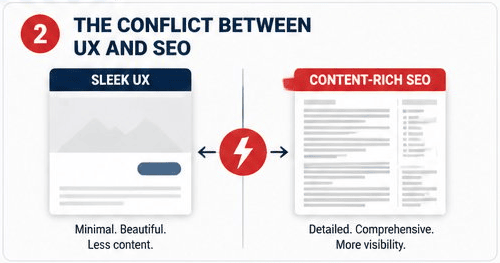
The adventure travel redesign had three specific SEO-killing decisions, each serious enough on its own. Together, they wiped out the site’s search visibility almost entirely within sixty days of launch.
Deleting Valuable Copy And Flattening Granular Topic Pages
The redesigned homepage cut 2,800 words of descriptive content down to roughly 300 words of taglines and button labels. From a visual standpoint, it looked cleaner. From a crawl standpoint, Google saw a page that had lost almost all of its topical signals overnight.
The more damaging mistake was URL consolidation. Dozens of specific trip pages, each targeting narrow high-intent queries, were merged into a single generic /alaska destination page. Pages that ranked for terms like “fly-in fishing Alaska lodge” and “remote bear viewing guided trips” simply ceased to exist. Those URLs returned 404 errors. There were no redirects. As outlined in multiple redesign analyses, consolidating granular pages into broad hubs without redirect mapping destroys the long-tail traffic those pages had accumulated for years.
Changing Title Tags And Meta Descriptions For Aesthetics
The design brief called for shorter, punchier title tags to match the new brand voice. Titles like Remote Alaska Bear Viewing Trips | Book a Guided Lodge Package were replaced with Alaska | Adventures Await. The keyword signals that had driven rankings for specific queries were replaced with phrases no one searches.
Meta descriptions were rewritten to sound like ad copy rather than search-intent summaries. This reduced click-through rates on the pages that did retain rankings, compounding the traffic loss.
Broken Redirect Strategy, Redirect Chains, And Crawl Errors
The site launched with fewer than twenty percent of the old URLs mapped to new destinations. The remaining pages returned 404 or 410 errors. Backlinks that had accumulated over years began pointing into dead ends.
Where redirects did exist, several ran through chains of two or three hops before reaching the final URL. Redirect chains dilute link equity and slow crawl efficiency. The combination of missing redirects, redirect chains, and broken internal links created a crawl environment that made it difficult for Google to understand what the new site was even about.
A Safer Blueprint For Search-Friendly Relaunches
The adventure travel disaster was entirely preventable. The fix is not to avoid redesigns; it is to engineer them so that visual goals and SEO goals are treated as parallel, non-negotiable requirements.
Using The Mullet Layout To Separate Visual UI From Crawlable Content
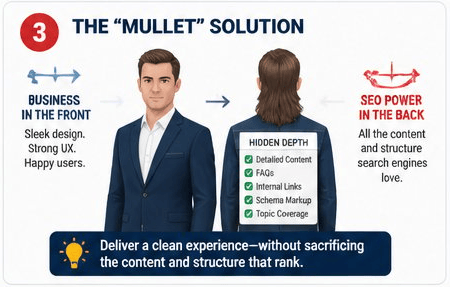
The mullet layout principle is simple: business in the front, content in the back. The visual UI is designed for the user. The DOM is structured for the crawler. These two things do not have to conflict.
In practice, this means using CSS accordions or collapsible content sections to house the full-length descriptive text that crawlers need, without cluttering the visual layout that users see first. The 2,800 words of homepage content can sit in an expandable section below the fold, fully present in the DOM and crawlable by Google, while the hero area and sticky CTA serve the conversion goal.
This is not cloaking. The content is accessible to any user who expands it. Structured, crawlable on-page content remains one of the most important technical SEO factors, and hiding it visually while keeping it in the DOM is an accepted and effective approach.
Keeping Granular URLs While Improving Site Architecture And Navigation
You can have a clean, hub-based visual navigation and still keep every granular URL active. The destination hub at /alaska can exist as a visual landing page that links out to the individual trip pages. Those trip pages keep their existing URLs, their keyword-targeted content, and their internal linking structure.
The sitemap and internal link architecture reflect the full depth of the site. The visual nav reflects the simplified user journey. Both goals are met without sacrificing either. A well-structured XML sitemap submitted to Google Search Console ensures the crawler sees the full picture, not just the simplified navigation.
Use schema markup on trip and destination pages to give Google additional structured data signals. This reinforces topical relevance even when the visual design is minimal.
Technical Safeguards For Speed, Sitemaps, And Structured Data
Page speed is a ranking factor and a conversion factor simultaneously. Run PageSpeed Insights on your new build before launch. Optimize images, implement caching, and use a CDN to reduce page load time. Core Web Vitals metrics including FID matter for both user experience and technical SEO performance.
Every image should carry descriptive alt text. Every page should have a canonical tag. The XML sitemap should reflect the new structure and be resubmitted to both Google Search Console and Bing Webmaster Tools immediately after launch.
Site architecture should be flat enough that important pages are reachable within three clicks from the homepage. This improves crawlability and distributes internal link equity more effectively across the site.
Launch Control And Post-Launch Recovery
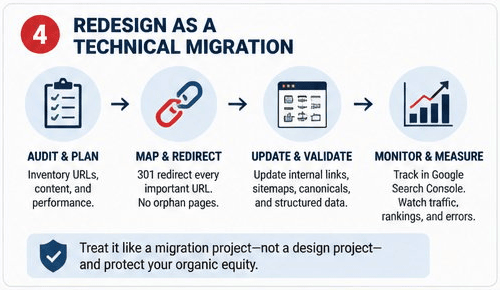
Going live without a verified launch checklist is where the final mistakes happen. A staging environment that is not properly validated will push broken pages, missing redirects, and incorrect robots.txt settings into production.
Staging Environment Checks Before Going Live
Before any code touches production, the staging environment should be blocked from indexing via the robots.txt file. Confirm this manually. Staging URLs that accidentally get crawled and indexed before launch create duplicate content problems and confuse Google about which version of the site is canonical.
Run Screaming Frog on the staging environment and compare the output against your pre-launch crawl. Every URL that existed on the old site should either map to a live equivalent or have a confirmed 301 redirect in place. Your web developer, project manager, and marketing lead should all sign off on the redirect map before launch day.
A complete redesign SEO checklist reviewed by all three stakeholders reduces the chance that a critical step gets skipped because it fell outside anyone’s defined responsibility.
Validating Redirects, Indexing, And Search Console Coverage
Within the first twenty-four hours of launch, submit your updated XML sitemap to Google Search Console and Bing Webmaster Tools. Monitor the coverage report for 404 errors, crawl errors, and excluded pages.
Manually test your highest-priority redirects. Do not assume that because they were set up in a spreadsheet they are firing correctly in production. Redirect chains and misconfigured rules are common and easy to miss until rankings start moving.
Check that canonical tags on the new site are pointing to the correct URLs. A canonical pointing to the staging domain is a surprisingly common post-launch error that suppresses indexing.
The First 30 Days Of Post-Launch Monitoring And Fixes
Set up daily rank tracking for your top target keywords during the first thirty days. Ranking volatility in the first two weeks after launch is normal. Rankings that continue dropping into weeks three and four indicate a structural problem that needs immediate attention.
Pull your post-launch seo performance data from Google Search Console weekly. Compare impressions, clicks, and average position against your pre-launch baseline. Significant drops in impressions usually point to indexing or crawl problems. Drops in clicks with stable impressions usually point to title tag and meta description issues.
Post-launch monitoring is not a nice-to-have. It is the difference between catching a recoverable problem in week two and discovering an unrecoverable one in month six. Assign ownership of this monitoring to a specific person, whether that is an in-house marketing lead or an external SEO partner, before the site goes live. Launching without that accountability in place is how businesses lose ground that takes years to rebuild.